|
|
#配置lic,
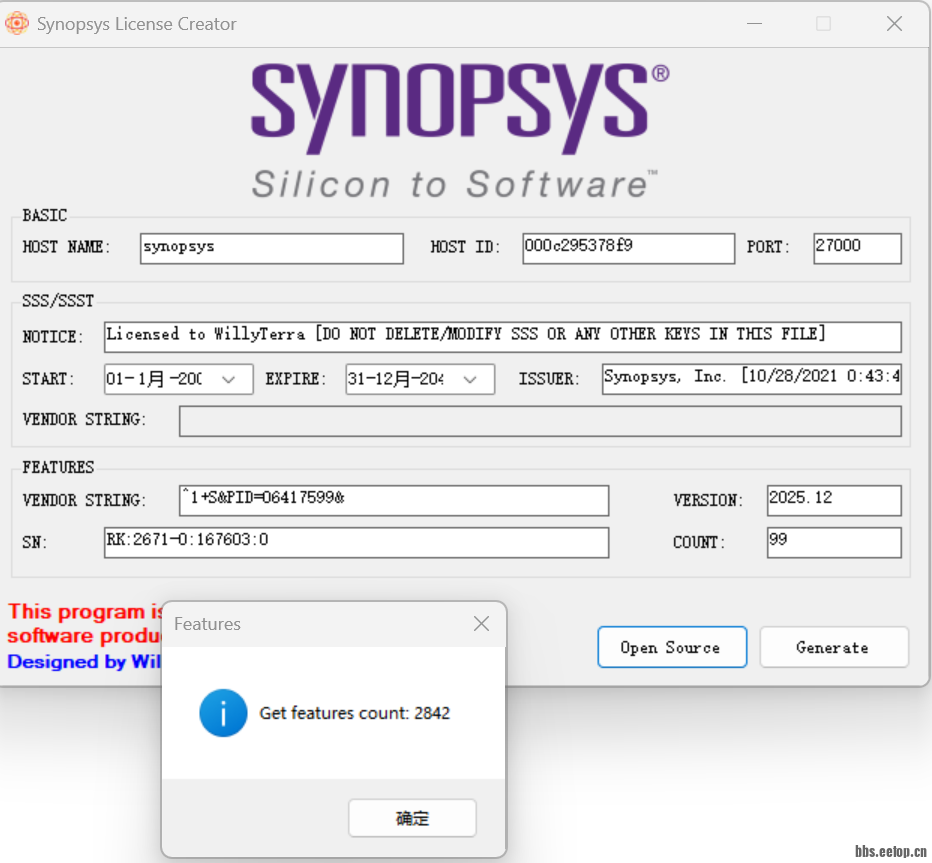
#先在windows系统上解压lic_gen目录下的peetop.cn_SynopsysLicenseGenerator V1.2压缩包,打开SynopsysLicenseGenerator.exe程序输入hostname和host id(就是mac地址),端口27000,
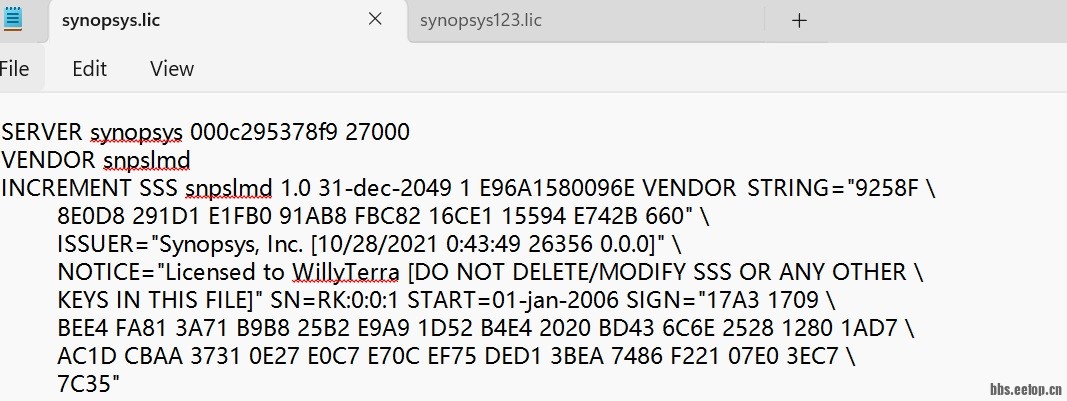
,生成的synopsys.lic文件
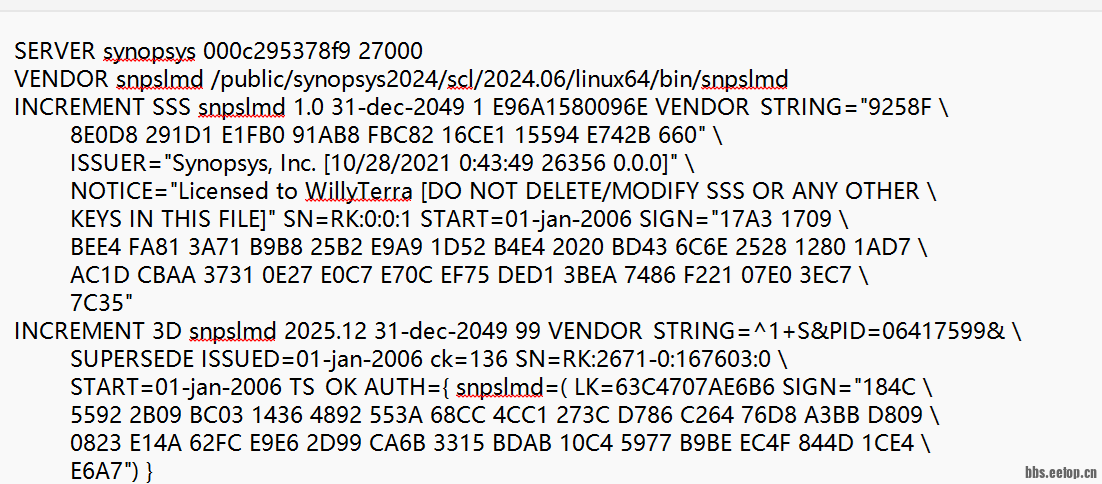
我看论坛有人说需要lic文档中将VENDOR snpslmd 改成VENDOR snpslmd /public/synopsys2024/scl/2024.06/linux64/bin/snpslmd,我两个文档都试过,结果将该lic文件传到/public/synopsys2024/scl/2024.06/linux64/bin和 /public/synopsys2024/scl/2024.06/admin/license/两个目录下,然后进入
cd /public/synopsys2024/scl/2024.06/linux64/bin
[root@synopsys bin]# ./lmgrd -c synopsys.lic
12/24/2025 15:07:15 (snpslmd) ------------------------------------------------------------------
12/24/2025 15:07:15 (snpslmd) Checking the integrity of the license file....
12/24/2025 15:07:15 (snpslmd) Valid SSS feature found.
12/24/2025 15:07:15 (snpslmd) The feature is needed to enable the other keys in your license file.
12/24/2025 15:07:15 (snpslmd) Licensed to WillyTerra
12/24/2025 15:07:15 (snpslmd) Siteid: 26356, Server Hostid: 000c295378f9, Issued on: 10/28/2021
12/24/2025 15:07:15 (snpslmd) ------------------------------------------------------------------
12/24/2025 15:07:15 (snpslmd) You are attempting to run the license server on a non-privileged domain/zone
12/24/2025 15:07:15 (snpslmd) Synopsys Licensing Server is restricted to run in this zone. Please contact support_center@synopsys.com for help
15:07:15 (lmgrd) snpslmd exited with status 33 (Bad configuration data)
15:07:15 (lmgrd) Please correct problem and restart daemons
#verdi启动不了
[root@synopsys bin]# ./verdi
logDir = /public/synopsys2024/verdi/W-2024.09-SP1/bin/verdiLog
Verdi (R)
Version W-2024.09-SP1 for linux64 - Dec 01, 2024
Copyright (c) 1999 - 2024 Synopsys, Inc.
This software and the associated documentation are proprietary to Synopsys,
Inc. This software may only be used in accordance with the terms and conditions
of a written license agreement with Synopsys, Inc. All other use, reproduction,
or distribution of this software is strictly prohibited. Licensed Products
communicate with Synopsys servers for the purpose of providing software
updates, detecting software piracy and verifying that customers are using
Licensed Products in conformity with the applicable License Key for such
Licensed Products. Synopsys will use information gathered in connection with
this process to deliver software updates and pursue software pirates and
infringers.
Inclusivity & Diversity - Visit SolvNetPlus to read the "Synopsys Statement on
Inclusivity and Diversity" (Refer to article 000036315 at
https://solvnetplus.synopsys.com)
rcfile = /public/synopsys2024/verdi/W-2024.09-SP1/bin/novas.rc
guiConfFile (read)= /public/synopsys2024/verdi/W-2024.09-SP1/bin/novas.conf (working directory)
guiConfFile (write)= /public/synopsys2024/verdi/W-2024.09-SP1/bin/novas.conf (working directory)
*WARN* Verdi-Elite (Verdi) license is not available. Try to check out Verdi-Apex (Verdi-Ultra) license.
[ERROR] Could not checkout Verdi Elite (Verdi) license. Use verdi -licdebug for more information.
[root@synopsys bin]# ./verdi -licdebug
logDir = /public/synopsys2024/verdi/W-2024.09-SP1/bin/verdiLog
Verdi (R)
Version W-2024.09-SP1 for linux64 - Dec 01, 2024
Copyright (c) 1999 - 2024 Synopsys, Inc.
This software and the associated documentation are proprietary to Synopsys,
Inc. This software may only be used in accordance with the terms and conditions
of a written license agreement with Synopsys, Inc. All other use, reproduction,
or distribution of this software is strictly prohibited. Licensed Products
communicate with Synopsys servers for the purpose of providing software
updates, detecting software piracy and verifying that customers are using
Licensed Products in conformity with the applicable License Key for such
Licensed Products. Synopsys will use information gathered in connection with
this process to deliver software updates and pursue software pirates and
infringers.
Inclusivity & Diversity - Visit SolvNetPlus to read the "Synopsys Statement on
Inclusivity and Diversity" (Refer to article 000036315 at
https://solvnetplus.synopsys.com)
rcfile = /public/synopsys2024/verdi/W-2024.09-SP1/bin/novas.rc
guiConfFile (read)= /public/synopsys2024/verdi/W-2024.09-SP1/bin/novas.conf (working directory)
guiConfFile (write)= /public/synopsys2024/verdi/W-2024.09-SP1/bin/novas.conf (working directory)
[SCL] SCL trace is enabled.
*WARN* License debug enabled. Check console for debug information
FlexNet Licensing checkout error: Cannot find license file.
The license files (or license server system network addresses) attempted are
listed below. Use LM_LICENSE_FILE to use a different license file,
or contact your software provider for a license file.
Feature: Verdi
Filename: /usr/local/flexlm/licenses/license.dat
License path: /usr/local/flexlm/licenses/license.dat:
FlexNet Licensing error:-1,359. System Error: 2 "No such file or directory"
license file(s): /usr/local/flexlm/licenses/license.dat
[SCL] 12/24/2025 16:25:06 PID:8686 Client:synopsys Checkout denied Verdi 2024.09
*WARN* Verdi-Elite (Verdi) license is not available. Try to check out Verdi-Apex (Verdi-Ultra) license.
FlexNet Licensing checkout error: Cannot find license file.
The license files (or license server system network addresses) attempted are
listed below. Use LM_LICENSE_FILE to use a different license file,
or contact your software provider for a license file.
Feature: VERDI-ULTRA
Filename: /usr/local/flexlm/licenses/license.dat
License path: /usr/local/flexlm/licenses/license.dat:
FlexNet Licensing error:-1,359. System Error: 2 "No such file or directory"
license file(s): /usr/local/flexlm/licenses/license.dat
[SCL] 12/24/2025 16:25:06 PID:8686 Client:synopsys Checkout denied VERDI-ULTRA 2024.09
[ERROR] Could not checkout Verdi Elite (Verdi) license. Use verdi -licdebug for more information.
#新手不知道配置步骤哪里错了,另外有Synopsy2020以上版本EDA软件安装教程.pdf中的方法我也试过 ./lmgrd -c Synopsys.bat还是不行
|
|
 /2
/2 

 eetop公众号
 创芯大讲堂
创芯大讲堂 创芯人才网
创芯人才网

 IP卡
IP卡 狗仔卡
狗仔卡 发表于
发表于  提升卡
提升卡 沉默卡
沉默卡 喧嚣卡
喧嚣卡 变色卡
变色卡

 创芯人才网
创芯人才网